
Review and update customer claims
Find claims and update their status in a merchant workspace.
Review a claim
- Open Claims in the workspace. Claims management needs a current plan that includes claims, such as the active Pro trial.
- Search by claim reference, customer, product, or warranty, or filter by status. Open the claim; View claims on a warranty narrows the list to that warranty.
- Review Issue, Customer & product, Issued warranty terms, Attachments, and History. The claim keeps the warranty details recorded when it was submitted.
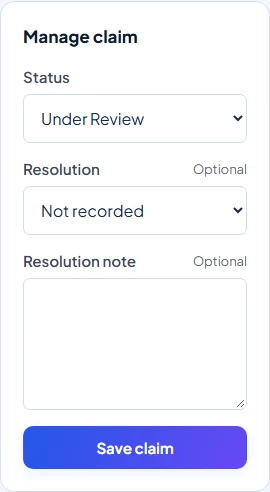
- In Manage claim, choose an available Status and select Save claim.
Decisions and permissions
Owners, Admins, Staff, and Technicians can view claims and make permitted progress updates, including approval. Only Owners and Admins can move a claim to Rejected, Resolved, or Closed. The status menu follows both the current status and your role.
To resolve a claim, choose a Resolution: Repaired, Replaced, Refunded, Not Covered, or Other. Add a Resolution note if useful. These labels record the outcome; choosing Refunded does not process a payment.
Notes and customer updates
Use Internal note for team-only observations, then select Add note. Internal notes are excluded from the customer claim history. Treat resolution information as customer-facing; the Customer Portal displays the outcome and status history.
A status change can send a customer email when an address is recorded and delivery is available. New claim emails go to the business contact email. Check Claims directly rather than relying on delivery.
Requests and follow-up
Customer requests at the top of Claims contains access requests and requests to add a verified email. These are separate from approving a product claim.
There is no Request information status or customer messaging thread in the current claim screen. Contact the customer through your usual business channel if more information is needed. Service records are maintained separately on the warranty.
If saving fails
Refresh a claim that another member has changed and choose an allowed next status. Ask an Owner or Admin for a restricted decision. After a trial ends, merchant claim management requires renewed eligibility even though existing records are retained.