
See what is happening across your warranties.
Understand warranty volumes, claim activity and service outcomes over time. Compare periods, explore the records behind the numbers and share results with your team.
Advanced Reporting: Scale only, for Owners and Admins. Not included in Free, Business, Pro, Enterprise or the Pro trial.
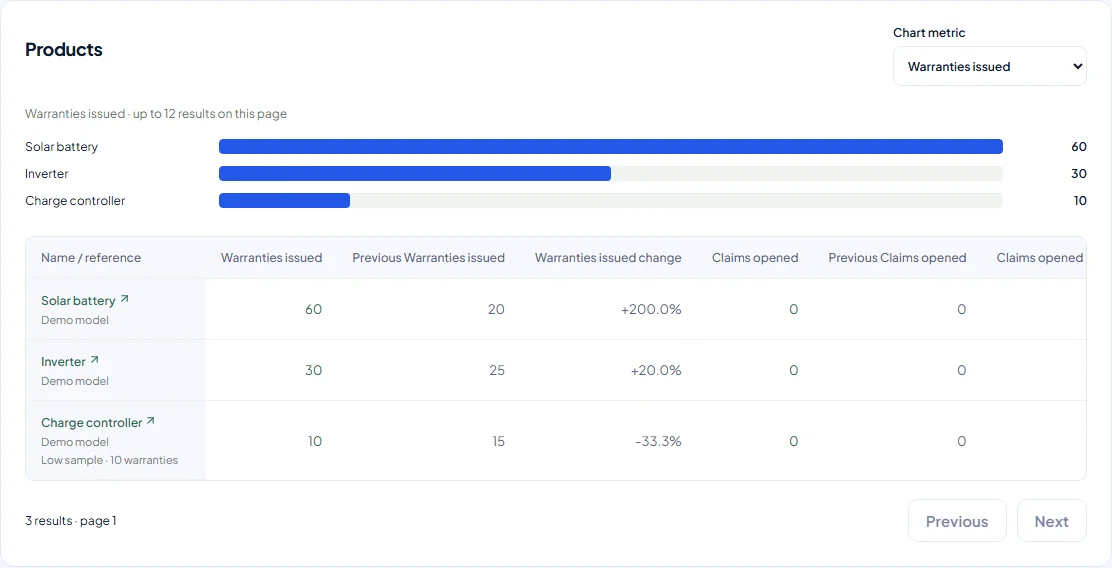
In this demo, September issuance rose from 60 to 100 warranties compared with the previous 30-day period. Solar batteries account for 60 of the 100 warranties, ahead of inverters (30) and charge controllers (10), a useful starting point for planning your team's warranty workload.
Go beyond the daily snapshot
Every plan includes a basic warranty dashboard. Scale adds period comparisons, detailed breakdowns and CSV exports, helping Owners and Admins understand activity across the workspace. Different dates, filters and record scopes can produce different counts.
Understand the basic dashboardCompare the periods that matter
Choose a date range and compare it with the previous period or year. Explore warranty, claim, product, customer and team activity to see where the numbers changed.
Details and availability
- Filter the available product, category, customer, status and member fields for the analysis you need.
- Distinguish current claim assignees from handling, decision and resolution actors.
- New reports use the workspace timezone. Older saved configurations retain their legacy UTC interpretation.
Follow the numbers back to the work
Review claim rates, product and category comparisons, expiration patterns, recorded decisions and resolution durations. Use contributing-record links where offered to inspect the records behind a metric.
Details and availability
- Claim rate counts selected issued warranties with a qualifying claim, not claim openings divided by issuance.
- Missing historical evidence is shown as unavailable. Operational insights describe recorded activity; they do not establish a product defect or forecast future failures.
Save time on your next review
Choose the available metrics, grouping and sorting for your review. Save a named report configuration so authorized teammates can return to the same setup without rebuilding it.
Details and availability
- Saved configurations keep fixed dates and settings, not a frozen snapshot of the underlying records.
- Saving a configuration does not schedule recurring email delivery.
Take the results into your next conversation
Download generated tables as CSV to share or work with outside Warly. Exports include every row in the selected table, not just the visible page. Keep the report dates, filters and generation time with the file.
Details and availability
- CSV is the supported export format; XLSX and PDF reporting exports are not available.
- Generated results expire after seven days and download links after two minutes. Saved configurations are separate.
Plan a useful reporting review
Review up to three years at a time, or up to 93 days with daily grouping. Reports are generated on request and can take several minutes. Check the generation time before using results for a decision.
Details and availability
- Identical requests may reuse results for 15 minutes. Recent changes may need a later generation; capacity limits can require a wait.
- Historical reports can reflect corrected records, current statuses and assignments. They are not immutable accounting snapshots.
Bring your warranty operations into focus.
Advanced Reporting is available to Owners and Admins on Scale. Contact Warly to discuss your reporting needs and arrange paid activation. The Pro trial does not include reporting.
Paid subscriptions require arranged activation. Contact Warly to discuss the right plan. Self-service checkout is not available.