
Find your warranties in the Customer Portal
Sign in to see warranties and claims linked to your customer account.
Open your account
- Open Customer Portal from the public site or Customer sign in in the Claim Center.
- Sign in with your customer account, or create and verify one using the email recorded on your warranties.
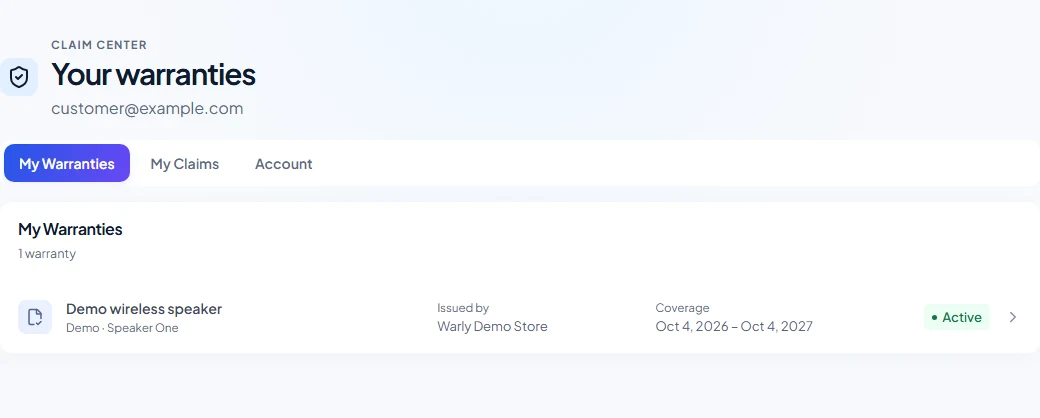
- Use My Warranties to see linked warranties and open their warranty page. Use My Claims to open a claim, its status updates, and uploaded supporting files.
- Use Account to check the signed-in email. Select Sign out when finished on a shared device.
Which warranties appear
Warly links warranties whose issued customer email matches your verified customer account, including warranties from different businesses. Email matching ignores letter case. An issuer-approved access request made while signed in can also link an eligible no-contact warranty.
Customer profiles in a merchant workspace and your Customer Portal account are different records. Phone matching for a guest claim alone does not add a warranty to your account.
Public page and account views
A public warranty link works without signing in and shows limited product and coverage information. Signing in gives you access to your linked warranties and claims; it does not give you access to the merchant workspace.
The current Customer Portal does not display merchant service history or warranty receipt/invoice files. Claim attachments are available in the claim detail after a completed upload. The public certificate has no product-photo gallery; product photos can appear in sharing previews.
If access changes
A linked Customer Portal account keeps access when an issuer corrects contact information. Owners and Admins can explicitly revoke or transfer portal access from the warranty page. Revocation removes future private access; the public certificate remains available under its separate public rules.
For a transfer, the issuer enters the destination email and confirms the change. Existing access remains until the destination signs in with a verified matching email. A pending transfer expires after seven days and can be cancelled by the issuer. Older warranties that have never been linked may need the issuer to initiate this verified transfer process.
Existing linked warranties and submitted claims remain available to customers after the issuer’s trial ends. New claims still depend on warranty eligibility and the issuer’s current plan. If you are sent back to sign in, sign in again and retry; if the warranty remains missing, follow the missing-warranty checks.