
Add and reuse catalog products
Save repeat product details for future warranties.
Open Product catalogWho can use the catalog
Owners, Admins, and Staff can view, create, and edit catalog products. Only Owners and Admins can import CSV files. Technicians do not have catalog access.
Add a product
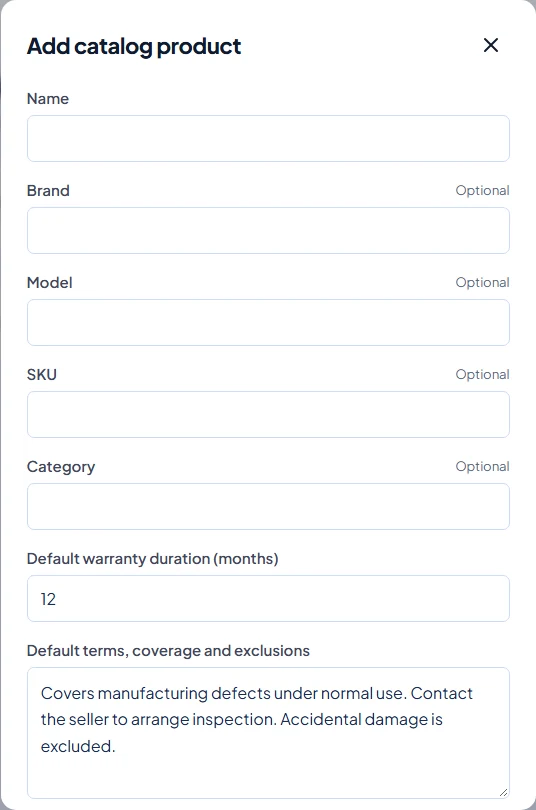
- Open Product catalog and select Add product.
- Enter Name. Brand, Model, SKU, and Category are optional.
- Set Default warranty duration (months) from 1 to 120, and review Default terms, coverage and exclusions.
- Optionally choose a product photo from the library or upload a new JPG, PNG, or WebP image up to 10 MB.
- Wait for any upload to finish, then select Save product.
Find and edit a product
- Search the catalog by name, model, or SKU; use pagination for more results.
- Select Edit beside the product.
- Update the fields or photo and select Save product. If another member changed it first, reopen the product and review the latest values before saving.
Reuse and historical records
When issuing a warranty, choose the saved product from the suggestions. Its details, photo, duration, and terms fill the form; check them for the sale. Catalog edits affect future selections and do not rewrite already issued warranties.
A SKU must not conflict with another saved product. Warly currently has no catalog Delete action. Removing a selected photo from the form does not delete the reusable library file or images already attached to issued warranties.