
Request and track a partner payout
Request available commission, choose an enabled method, and understand payout statuses.
Request a payout
- Open Payouts, then Requests in the Partner Portal.
- Check Available balance, Pending payout requests, and the current minimum shown in the form.
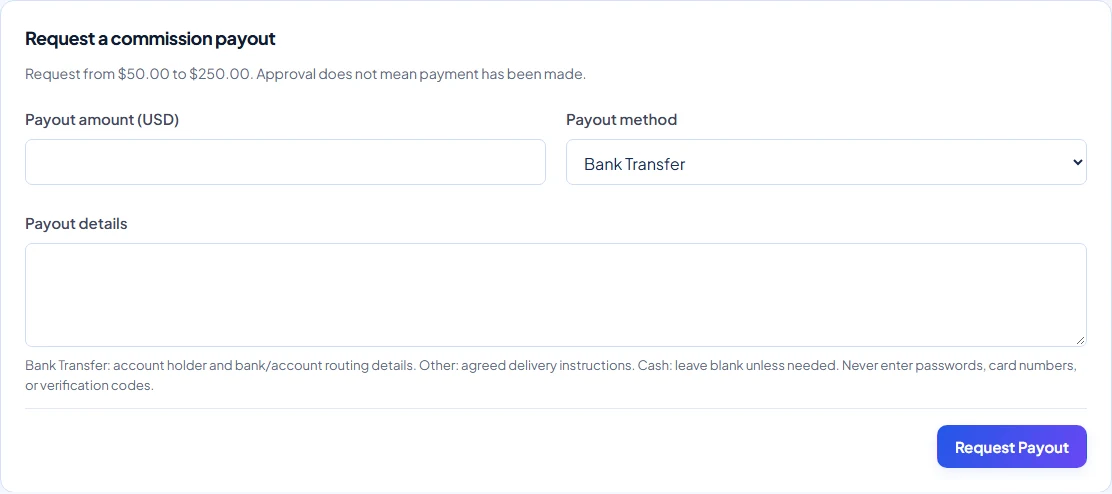
- As an active partner, enter a USD amount between that minimum and your available balance.
- Choose a method enabled for your account: Cash, Bank Transfer, or Other when offered. Enter payout details where required.
- Submit the request and check that it appears as Pending. The amount is reserved and no longer available for another request.
Request statuses
| Status | Meaning / next step |
|---|---|
| Pending | Submitted for review; you can cancel it. |
| Approved | Approved but not yet paid; contact Warly if it needs changing. |
| Paid | Payment has been recorded; review payment details and Payouts / History. |
| Rejected | Not approved; read the reason and address it before a new request. |
| Cancelled | Request stopped; the reservation is released. |
Cancel or correct a request
Use Cancel request on a Pending request and provide the requested reason. Submitted requests cannot be edited. If a pending amount or method is wrong, cancel and create a corrected request. Once Approved, contact Warly; partners cannot approve, reject, mark paid, or cancel an approved request themselves.
If the form is unavailable
You may be below the current minimum, have insufficient available USD after reservations, lack an enabled method, or have an inactive partner account. Contact Warly if a method needs enabling. Permission to collect merchant cash does not automatically enable Cash commission payouts.
Use the details and history shown in the portal to follow payment. An Approved request is not a promise that the money has already been transferred.